Pixeldrop: A Bold Display Font for Modern Urban Projects
Understanding the Visual Impact of Pixeldrop
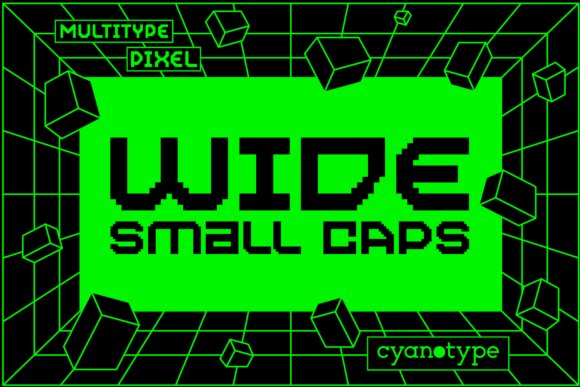
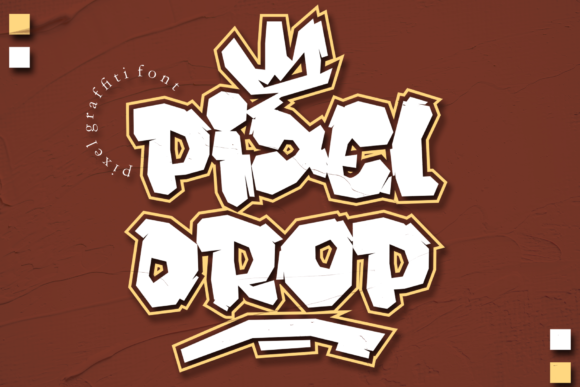
When you first see Pixeldrop, it grabs your attention immediately. This isn't a subtle typeface that blends into the background. It's a display font built for headlines, logos, and moments where you need text to make a statement. The design merges two distinct worlds: the raw, expressive energy of graffiti style letterforms and the structured, digital precision of pixel art. The result is a typeface that feels both streetwise and tech-savvy.
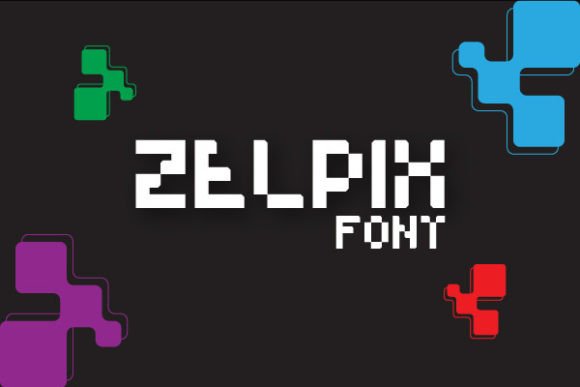
What makes Pixeldrop visually distinctive is how it balances these elements. The letter shapes carry the fluid, dynamic movement you'd associate with spray-painted tags, but the edges and details are defined by pixel accents. This gives the font a unique texture. It doesn't look like a generic graffiti font, nor does it look like a standard pixel typeface. It occupies its own space, offering a creative font option that stands apart in a crowded market of display fonts.
Where Pixeldrop Truly Shines
Choosing the right typeface for a project comes down to context. Pixeldrop isn't designed for body copy in a long-form article or the fine print on a legal document. Its strength lies in high-impact applications where personality and visual weight matter most.
Logo design and brand identity projects benefit significantly from a typeface like this. If you're building a brand for a streetwear label, a gaming channel, a music festival, or a youth-focused tech startup, Pixeldrop can serve as the foundation of your brand identity. It communicates confidence, creativity, and a connection to digital culture. The font's inherent boldness means a logo set in Pixeldrop will be memorable and recognizable, even at smaller sizes where the pixel details become texture rather than distinct elements.
Beyond logos, think about packaging design. A craft brewery, a specialty coffee roaster, or a snack brand targeting a younger demographic could use Pixeldrop on their labels and boxes. The graffiti influence adds an authentic, handmade edge, while the pixel elements keep it from feeling too chaotic or unrefined. It's a premium font choice that elevates packaging from ordinary to eye-catching on a crowded shelf.
In the digital space, Pixeldrop excels in web design headers, social media graphics, and video thumbnails. Content creators on platforms like YouTube, Twitch, or TikTok often need typefaces that pop in a thumbnail or a short-form video. This font delivers that visual punch. It's also effective for event posters, album covers, and promotional materials where the goal is to stop someone mid-scroll.
Practical Considerations for Using This Typeface
Before committing to Pixeldrop for a project, take a few practical steps. First, evaluate the project's tone and audience. The font's personality is bold, urban, and contemporary. If your audience expects a formal, traditional, or understated aesthetic, this typeface will create a mismatch. But if your project calls for energy, edge, and a modern feel, it's a strong candidate.
Next, consider font pairing. A display typeface like Pixeldrop works best when paired with a more neutral companion for supporting text. A clean sans serif font for body copy creates a balanced hierarchy. The contrast between the expressive display type and the functional body type helps guide the reader's eye and maintains readability across your layout. Avoid pairing it with another highly decorative or expressive typeface, as the two will compete for attention and create visual noise.
Test the font at the actual sizes you'll use it. Pixeldrop is designed to be a display font, meaning it's optimized for larger sizes. At very small sizes, the pixel details may become muddy or illegible. Print a test page or view a mockup on screen at the intended scale. This step is essential for editorial design projects like magazine covers or book jackets, where the type needs to read clearly from a distance or in a thumbnail.
Review the character set and any included styles. Many premium fonts come with alternate characters, ligatures, or multiple weights. Understanding what's included helps you make the most of the typeface. Check for the glyphs you need, especially if your project involves special characters or multilingual support.
Finally, confirm the commercial font licensing. If you're using Pixeldrop for a client project, a product you're selling, or a business venture, ensure the license covers commercial use. Licensing terms vary, and using a font outside its license can create legal complications down the road.
Making the Most of a Creative Display Font
A typeface like Pixeldrop is a tool, and like any tool, its value depends on how you use it. One of the most common mistakes with bold display fonts is overuse. Setting an entire poster or website header exclusively in Pixeldrop can overwhelm the viewer. Instead, use it strategically. Set your headline or logo in the font, then let a simpler serif font or sans serif font handle the supporting information. This approach creates a clear visual hierarchy and ensures your message is both impactful and readable.
Pay attention to spacing. Fonts with strong stylistic features often benefit from adjusted letter-spacing, especially in all-caps settings. A little extra tracking can improve legibility and give the letters room to breathe. Experiment with this in your design software before finalizing your layout.
Color choice also plays a role. Pixeldrop looks striking in high-contrast color combinations. Think white text on a dark background, or a vibrant accent color against a neutral palette. The pixel details in the font become more visible and interesting when there's enough contrast to let them stand out.
For entrepreneurs and small business owners exploring modern typography for the first time, Pixeldrop offers a relatively low-risk way to inject personality into your visual materials. It's the kind of design asset that can unify the look of your social media posts, website banners, and printed materials. When used consistently, a distinctive typeface becomes part of your brand's visual language, helping customers recognize your content before they even read a word.
Whether you're a designer working on a client brief, a content creator refreshing your channel's look, or a small business owner building your first brand kit, Pixeldrop provides a bold foundation. Its blend of graffiti energy and pixel precision makes it a versatile creative font for projects that need to feel current, confident, and unmistakably cool.